
A Google Forms Alternative With More Features
Floov lets you create forms with custom colors and fonts and manage responses for free. Conditional logic, file uploads, and team collaboration are available with Pro. Google Forms is a practical choice for questionnaires, quizzes, and working directly in Google Sheets.
Floov or Google Forms?
Choose Floov When
Floov is a good fit when you want to customize client-facing forms and manage responses in the same place. Choose Pro for conditional routes, a custom domain, or separate access levels for your team.
Choose Google Forms When
Google Forms may be a better fit for quick internal forms, quizzes, or teams that want responses to flow directly into Google Sheets.
Floov and Google Forms Pricing
Pricing is only useful alongside the limits and capabilities included in each plan.
Floov
Free, or Pro at €24/month or €240/year with VAT included. Both include unlimited responses under Fair Use. Free includes core building, publishing, and integrations.
Google Forms
Google Forms is available to consumers with a Google account and is included in Google Workspace offerings. Workspace pricing and administrative features depend on the selected edition.
This comparison focuses on the form workflow, not the wider value of a Google Workspace subscription.
Floov vs Google Forms
Compare form design, branching, uploads, and response management against the tools your team already uses.
Customer-Facing Design
- Floov
- Themes, dark mode, custom colors, fonts, radius, flexible layouts, backgrounds, styled content, and page animations
- Google Forms
- Theme and background colors, header images, and font style and size controls
Branding and Domains
- Floov
- Pro removes Floov branding and publishes forms on a custom domain
- Google Forms
- A public link hosted by Google; the form can also be embedded on your website
Visual Workflow
- Floov
- Pro combines conditions in a visual graph and routes between pages, default destinations, and custom endings
- Google Forms
- Section routing based on answers is available for Multiple choice and Dropdown questions
Uploads Without Sign-In
- Floov
- Respondents can upload to a Pro form without a Google account; private downloads require access to the form’s responses
- Google Forms
- File upload questions require respondents to sign in to a Google Account
Workspace Roles
- Floov
- Pro includes owner, admin, editor, and viewer roles for up to 25 total members without a per-seat fee
- Google Forms
- Form owners share editing access with collaborators through Google’s sharing model
Publishing Control
- Floov
- Draft edits remain separate from the live form until you choose to publish again
- Google Forms
- Forms are published and sent with responder access controls in the Google ecosystem
Response Operations
- Floov
- Search, filter, edit individual records, export to CSV or Excel, analyze Insights, and publish live reports
- Google Forms
- Charts, individual responses, CSV export, Google Sheets connections, and add-ons
Google Ecosystem
- Floov
- Can deliver responses to Google Sheets while keeping form building and response work in Floov
- Google Forms
- The stronger choice for quick internal forms, quizzes, and a familiar Google Sheets-first workflow
The Differences That Affect Daily Work
Brand and Layout Control
Floov offers themes, dark mode, custom colors, fonts, radius, page backgrounds, columns, styled content, and page animations. Google Forms provides theme colors, a header image, and typography choices in a familiar editor. For a customer-facing intake or campaign, Floov’s extra control helps the form feel like part of the product or brand; for a quick internal questionnaire, Google’s simpler treatment may be enough.
Branching and File Uploads
Google Forms can route respondents to sections from Multiple choice and Dropdown answers. Floov Pro supports combined conditions in a visual workflow that routes between pages and custom endings. Google’s file-upload question requires respondents to sign in to a Google Account, while a Floov respondent can upload to a Pro form without a Google sign-in.
Responses and Collaboration
Google Forms is practical when your team works in Drive: view charts and individual responses, download a CSV, or connect the form to Sheets. In Floov, you can search, filter, and edit responses, export to CSV or Excel, and share a report. Pro adds Advanced Insights and four roles for workspace access.
Create the Form You Need
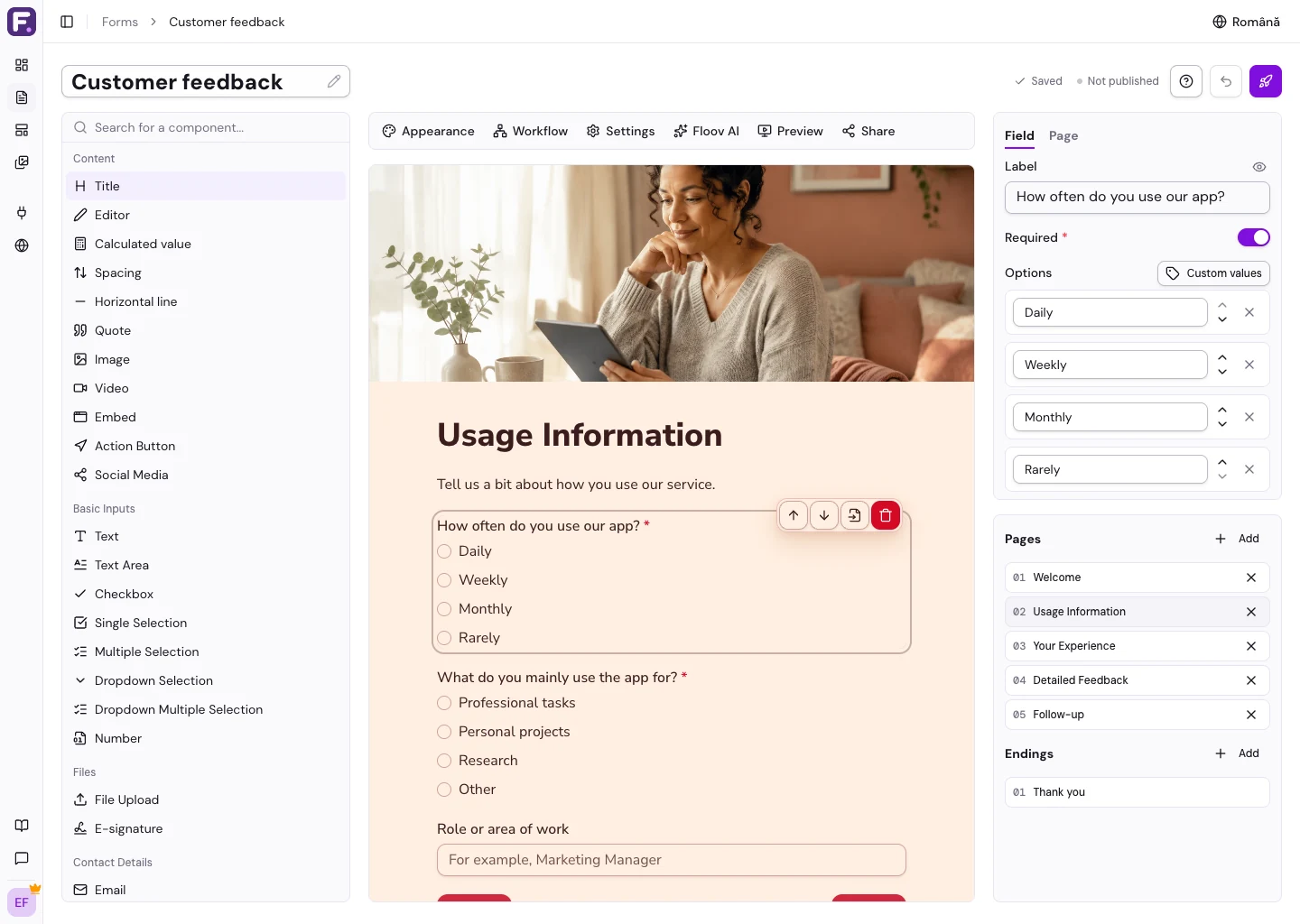
Start with a template or a blank form. Add your questions, choose colors and fonts, then preview and publish your form. These steps are available for free. Conditional logic and team collaboration require Pro.
How to Evaluate a Move From Google Forms
Test one representative form before moving everything. Keep historical Google Forms responses as an export because they are not imported into Floov.
-
1
List the forms that need stronger branding, logic, file uploads, or response operations.
-
2
Recreate your questions and sections in the Floov editor. If you use branching, configure routes between pages with Pro.
-
3
Recreate collaborators as Floov Pro workspace members with the appropriate roles.
-
4
Test uploads, integrations, embeds, confirmation emails, and exports before replacing the Google Forms link.
Explore Floov Before You Decide
Check the product areas behind the claims in this comparison.
Frequently Asked Questions
Answers about choosing Floov as an alternative to Google Forms.
Google Forms suits questionnaires, quizzes, and working directly in Sheets. Floov is a good fit for custom form design and response management. Advanced logic, custom domains, and workspace roles are available with Floov Pro.
Yes. Floov Pro provides a visual workflow editor that routes between pages and custom endings using conditions from supported field types.
No. A respondent can upload a file to a Pro Floov form without signing in to Google. To download files, you must be signed in to Floov with access to the form’s responses.
Yes. Floov exports responses to CSV or Excel and can also deliver responses to Google Sheets through its integration.
Yes. Free includes templates, multi-page forms, custom colors and fonts, unlimited responses under Fair Use, CSV or Excel export, and the Google Sheets integration. Conditional logic, uploads, branding removal, custom domains, and team collaboration require Pro.
How We Built This Comparison
- We test Floov against the current production product and approved plan limits.
- We verify competitor pricing and capabilities using official pricing, product, and help documentation.
- We compare the buying factors that most often change a form workflow: allowances, authoring, logic, branding, collaboration, response work, integrations, and specialist features.
- We state where the competing product is the better fit and avoid scoring features that are not directly comparable.
Floov publishes these comparisons. We aim to be accurate and fair, but product packaging can change. Check each provider’s linked documentation before purchasing.
Official Sources
Reviewed by Floov Product Team. We checked Google Forms claims against these official pages on .
Compare Other Form Builders
View All ComparisonsFloov vs Typeform
Unlimited response collection, flexible layouts, and team pricing versus a polished conversational experience.
Floov vs Jotform
A focused form workflow versus a broad ecosystem for widgets, payments, documents, and apps.
Floov vs Tally
Visual workflows, explicit roles, and structured response work versus document-style authoring and broad free features.