
Employee Time-Off Request Forms: What to Include and How to Automate Approvals

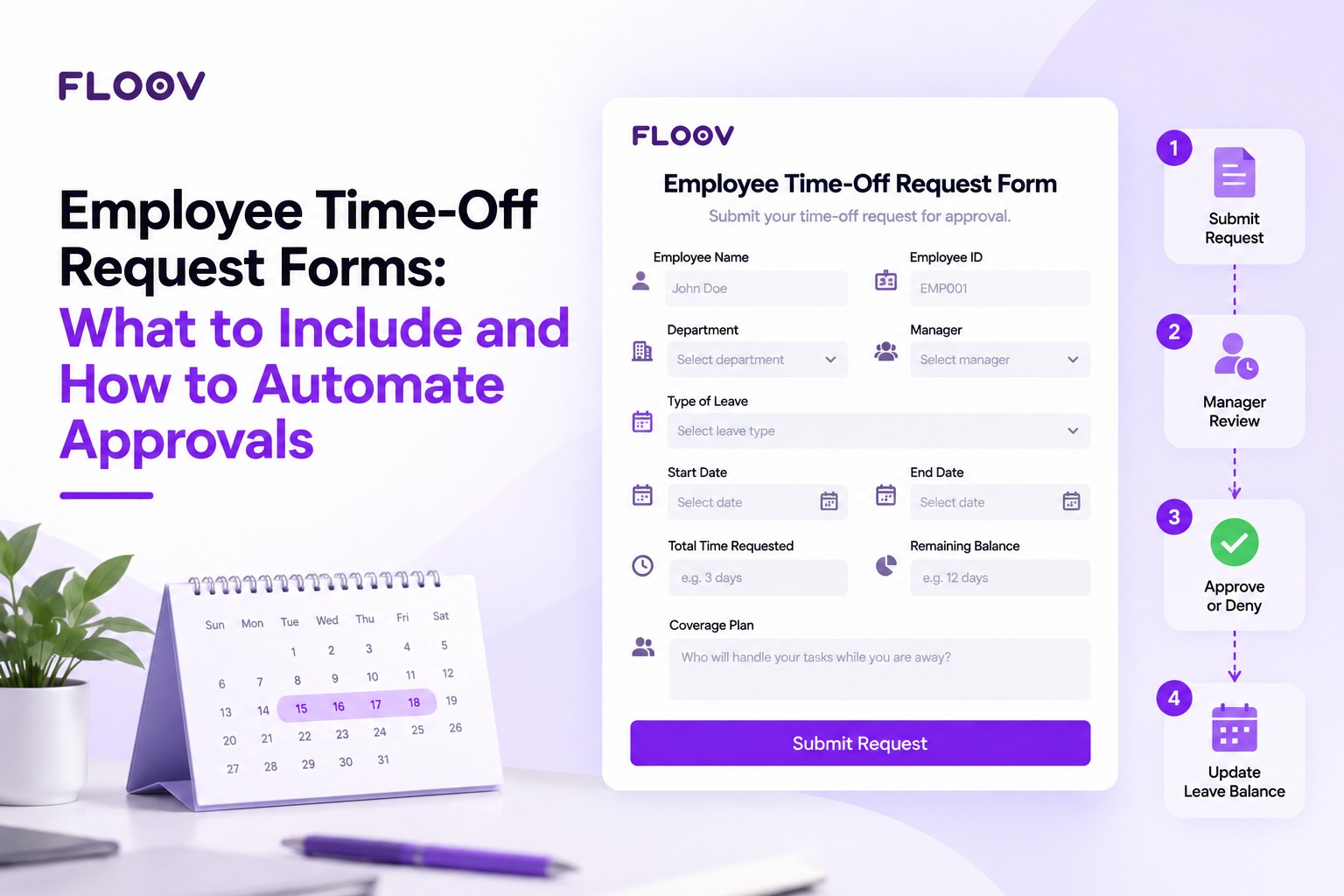
A message in the chat, a partially filled spreadsheet, a manager who didn't respond. This is the typical way leave is dealt with and where errors are made. Well-designed Employee Time-Off Request Forms replace that mess with one streamlined process. Staff know where to ask, managers know what to decide, and HR has a clean record. This guide helps you understand what to include, how approvals should flow, and where automation can help the most.
Why a Structured Time Off Request Form Matters
A standard time off request form collects the same information every time. This uniformity avoids misread dates, unchecked balances, and arguments about who asked first. It also gives payroll a reliable record to follow if questions come up months later. For managers, it shows coverage gaps before approval. For the employee, it confirms that the request has been received.
What to Include in a Time Off Request Form
Keep the form short. Two minutes should be enough to complete it. These fields address most needs:
- Employee details: name, ID, department, and direct manager.
- Leave type: vacation, sick, personal, parental, or unpaid.
- Dates: start date, end date, and half day (if applicable).
- Total time requested: days or hours, so no one has to count.
- Remaining balance: tells the approver whether the request fits.
- Coverage plan: who will handle urgent work while the employee is away.
- Reason (optional): only for certain types of leave.
- Approval section: manager decision, comments, and date.
Don't ask for medical information. If a leave type requires documentation, state this on the form instead of asking for it in the reason box.
How to Fill Out a Time-Off Request Form: Steps for Employees
A properly completed form is approved quicker:
- Fill in your name, department, and manager.
- Select the appropriate type of leave.
- Enter the exact start and end dates, including half days if applicable.
- Check your remaining balance against the number of days requested.
- Name a person to handle critical tasks.
- Submit early (two weeks ahead for longer breaks).
How to Request Time Off from a Full-Time Job
Most full-time employers follow the same process. You check your leave balance and company policy, submit the request through the designated form or system, and your manager reviews it against team workload. Upon approval, you receive a confirmation and the days are deducted from your balance. Ask about any restrictions during busy periods, notice rules, or blackout dates. Be sure to get approval in writing before assuming it.
How the Approval Workflow Works
A typical workflow has four stages. First, the employee submits the request. Second, it goes to the manager, who checks the team calendar and workload. Third, the manager approves, denies, or suggests other dates. Fourth, HR or payroll records the result and adjusts the balance. A second approver is generally not required, although one can be added for long leave. The most common delay is a request sitting unread in an inbox, and connecting the form to a notification tool can help with that.
Automating Time-Off Approvals
Manual approvals depend on human memory. Automation removes that reliance. A Floov form collects every request in the same structure, and conditional logic (Pro) can direct respondents to different pages or endings based on their answers. For instance, "Yes" to a half-day question can lead to a page asking which half, while "No" skips it. Employees land on an ending page that confirms their request has been submitted. Floov does not approve requests on its own, so connect it to Slack, Google Sheets, Zapier, or Make to alert the manager and record the decision. Those connected tools can run balance checks, reminders, and calendar updates without HR re-entering the same dates in a spreadsheet.
You don't need to know any coding. Teams can use Build Form With AI to write a brief about the fields they need and then review the preview before publishing. This also works for other HR documents. For example, Recruitment Application Forms can be used alongside leave forms, and a Recruitment Form Builder keeps the forms uniform without additional coding.
Start small. Choose your fields, assign one approver per team, name a backup approver for when they are unavailable, and link a notification. Free includes unlimited responses under Fair Use, while conditional logic and file uploads require Pro. Review the process after one month and adjust as necessary.
Final Thoughts
Clear fields, a single approver, and automatic routing make leave requests easy. When these three pieces are in place, everyone saves time. A Floov form is a simple way to put all of this into practice. Add the fields covered above, such as leave type, dates, remaining balance, and coverage plan, publish the form to a public link, and review every request in one dashboard. Use conditional logic to route half-day requests to their own page, and connect Slack, Google Sheets, Zapier, or Make so managers are alerted and decisions are recorded. Start on the free plan, test the form with one team, and expand once the process works.
Frequently Asked Questions
Common questions about the topics covered in this article.
It should include employee information, leave type, start and end dates, number of leave days, leave balance, coverage plan, an optional reason, and manager sign-off. Keep it concise so employees can finish quickly and managers can decide without seeking additional information.
The employee fills out the form and it goes to their manager. The manager checks workload and team calendars, then approves, rejects, or suggests other dates. The result is sent to HR or payroll, and the leave balance is updated. Longer absences may require further authorisation.
Partly. A Floov form gathers requests in a consistent structure, and conditional logic (Pro) can direct respondents to different pages or endings. Connected tools such as Slack, Google Sheets, Zapier, or Make can run approvals, reminders, and calendar updates, reducing manual entry and missed requests.
A PTO request form covers paid time off, such as vacation or personal days. A leave request form is broader and covers extended or protected leave, including medical, parental, and unpaid leave, which may need documentation and follow legal requirements.
Use one standard form, limit fields to what approvers need, assign one approver per team, and send notifications through connected tools. Share the policy so employees know notice periods, and review the process periodically.